Remote Work Setup The Ultimate Guide to Building a Comfortable Productive Workspace

Understanding the Importance of a Proper Remote Work Setup
Creating a good remote work setup isn’t just about placing your laptop on a table and hoping productivity magically appears. It’s about building an environment that supports focus, creativity, and efficiency—without draining your energy. Whether you’re working full-time from home or juggling hybrid tasks, the quality of your workspace plays a massive role in how well you perform. A well-designed setup reduces burnout, minimizes distractions, and improves your overall workflow.
Another reason a proper setup matters is your physical well-being. Poor posture, bad lighting, and uncomfortable seating can lead to long-term health issues like back pain, wrist strain, and eye fatigue. Many people ignore this until they start feeling physical discomfort, but by then, the damage has already begun. Investing a little time to set things up right can save you from years of unnecessary discomfort.
Having a defined workspace also impacts your mindset. When you sit down in a space dedicated to work, your brain knows it’s time to shift gears. Without this mental separation, it becomes harder to focus, your tasks take longer, and you end up feeling like your workday never truly ends. A clear boundary between “home mode” and “work mode” makes work-life balance far more manageable.
A good setup also boosts motivation. When your environment feels clean, comfortable, and inspiring, you naturally feel more capable of getting things done. It becomes easier to maintain consistency and avoid procrastination. This is why many successful remote workers treat their workspace like an investment rather than an afterthought.
Finally, a proper remote work setup simply makes your job more enjoyable. You spend hours each day at your desk, so why not make that space feel good? A space that you actually like being in can make even the most challenging tasks feel less overwhelming.
Essential Equipment for a High-Performance Remote Workspace
The foundation of a proper remote work setup starts with equipment. A high-quality laptop or desktop that meets the requirements of your job is non-negotiable. Slow devices can kill productivity and raise your stress levels quickly. If your computer lags every time you open multiple tabs, consider upgrading—your time and peace of mind are worth it.
Equally important is your internet connection. A stable, high-speed network prevents disruptions during meetings, uploads, and time-sensitive projects. Many remote workers even invest in backup options like mobile hotspots to avoid downtime during outages. Reliability is the backbone of remote work.
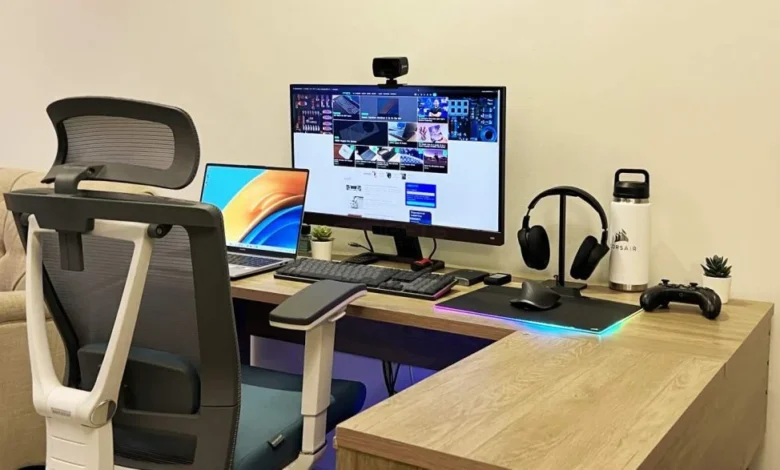
A good desk and chair are essential, not optional. Ergonomic chairs support your back, neck, and posture, while the right desk height ensures you maintain a natural wrist and spine alignment. Adjustable standing desks have become popular, offering flexibility and helping prevent sedentary fatigue. Comfort matters, but ergonomics matter even more.
Consider investing in external accessories like a keyboard, mouse, and monitor. Even if you work on a laptop, extended screen space helps you multitask and reduces eye strain. An external keyboard and mouse allow you to position your laptop at eye level, improving posture drastically. These accessories may seem small, but they transform your work experience.
Lighting is another key component that many overlook. Natural light boosts mood and focus, but if your room doesn’t have enough sunlight, a warm desk lamp can help reduce eye strain. Good lighting also ensures you look professional during video calls. Equipment enhances not just your efficiency but your overall remote work experience.
Designing a Workspace That Boosts Comfort and Productivity
The location of your workspace matters more than you might think. Ideally, you should choose a spot away from high-traffic areas, reducing background noise and interruptions. Even if your home is small, finding a corner and dedicating it to work helps build consistency. A quiet environment can significantly improve focus.
Your workspace should also reflect your personal style. Adding a few decor elements—like plants, artwork, or an inspirational piece—can make the area feel inviting. The goal isn’t to clutter your desk but to make the space feel like somewhere you enjoy spending time. A touch of personality can do wonders for motivation.
Clutter is the enemy of productivity. Keeping your desk clean, organized, and minimal helps prevent mental overload. Use storage boxes, cable organizers, or small shelves to keep essentials accessible but tidy. When everything has a place, your workflow becomes smoother and less stressful.
Temperature and air quality also influence productivity. Working in a room that’s too hot, too cold, or poorly ventilated can drain energy quickly. Small adjustments like using a fan, air purifier, or opening a window can help maintain a comfortable atmosphere. Your environment should energize you, not exhaust you.
Lastly, think about boundaries. A dedicated workspace physically separates your job from your personal life. When you leave that area, you’re done for the day. Over time, this reduces burnout and helps you enjoy your time off without work creeping into your thoughts.
Tech Tools and Digital Systems for Remote Work Success
The right digital tools are just as important as the physical setup. Project management platforms like Trello, Asana, or ClickUp help you keep tasks organized and deadlines clear. These tools prevent confusion, especially when collaborating with remote teams. Structure is key when you don’t have in-person interactions.
Communication tools such as Slack or Microsoft Teams make it easy to stay connected with colleagues without overwhelming your inbox. Quick messages reduce misunderstandings and help you maintain real-time collaboration. The more efficient your team’s communication is, the smoother your workday becomes.
Cloud storage platforms like Google Drive or Dropbox ensure your files are safe and accessible from anywhere. They also make collaboration easier since everyone can work on the same document without losing track of updates. Remote work thrives on seamless file sharing and organization.
Time-management and focus tools can also transform your productivity. Apps like Notion, Todoist, or even simple Pomodoro timers help you stay on track and break your tasks into manageable portions. Discipline becomes much easier when technology supports your routines.
Security tools shouldn’t be forgotten either. VPNs, password managers, and two-factor authentication protect sensitive data and prevent cyber threats. Remote work comes with digital risks, so taking steps to secure your virtual environment is essential.
Creating Work–Life Balance When Working from Home
One of the hardest challenges of remote work is separating professional responsibilities from personal life. When your home becomes your office, boundaries blur. That’s why establishing a consistent daily schedule is crucial. Routines help you mentally transition between work mode and personal time.
Taking regular breaks is equally important. Sitting for long periods drains productivity and harms your health. Short walks, stretching, or simply stepping away from your desk can refresh your mind. Breaks aren’t a luxury—they’re part of sustainable productivity.
Make sure to set expectations with your household as well. Whether you live with family or roommates, communicating your work hours reduces interruptions. Everyone benefits when there’s a shared understanding of when you need quiet time.
Another effective strategy is planning a “shutdown ritual.” This could be closing your laptop, tidying your desk, or reviewing your completed tasks. This simple habit signals to your brain that work is done for the day. Over time, it becomes easier to relax once your tasks are complete.
Lastly, remember to enjoy the flexibility remote work offers. Spend time on hobbies, go outside, or connect with loved ones. Remote work shouldn’t feel like being trapped inside—it should give you the freedom to balance productivity with personal joy.
FAQs
1. What equipment do I need for a remote work setup?
A reliable computer, stable internet, ergonomic chair, desk, and external accessories like a monitor, keyboard, and mouse are essential.
2. How can I stay productive working from home?
Set a routine, minimize distractions, keep your workspace organized, and use productivity tools.
3. Is it necessary to have a separate room for remote work?
Not necessarily. A dedicated corner or small section of your home works fine as long as it’s quiet and comfortable.
4. How do I maintain work–life balance at home?
Use schedules, take breaks, create boundaries, and avoid working outside your designated hours.
5. What is the best chair for remote work?
Ergonomic chairs with lumbar support are ideal, especially if you work long hours.